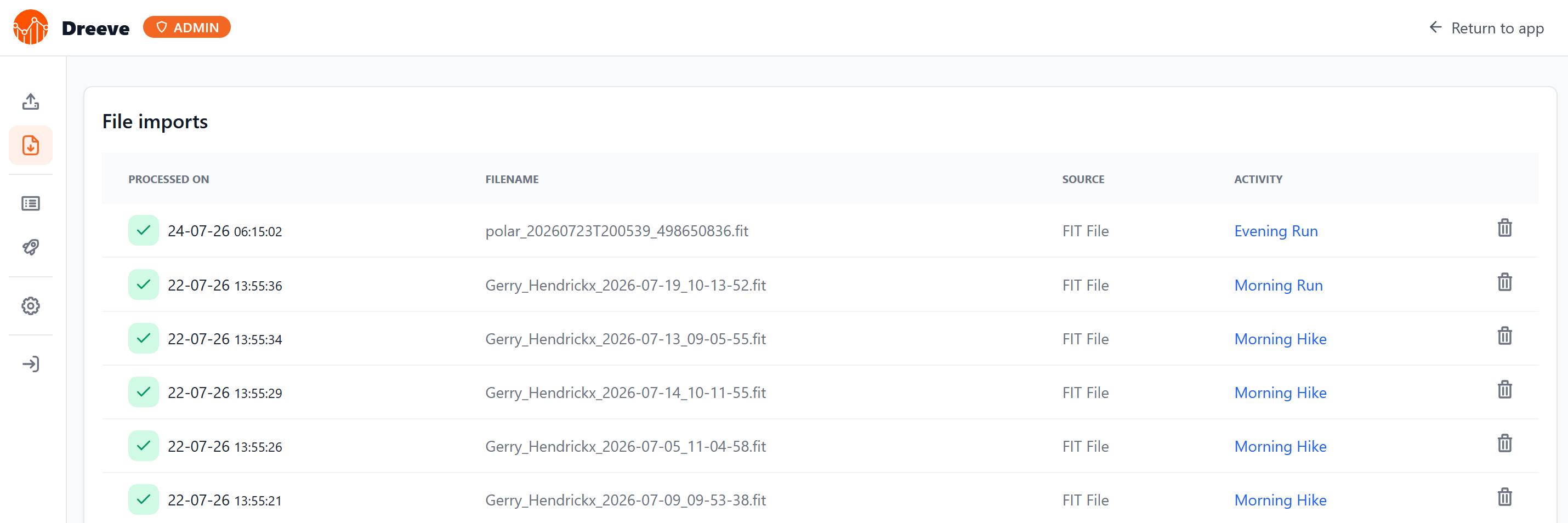
The self-hosted stats dashboard I run used to be called Strava Statistics. In June 2026, Strava restricted their API to paying subscribers, and I do not pay for Strava. The project rebranded to Dreeve in response, a deliberate move to decouple from Strava rather than stay tied to an API that could tighten further. Dreeve can still import from Strava, but will require a subscriptions. It also accepts files directly through a watch folder that ingests any FIT, TCX, or GPX dropped into it, and that is the path I use.
I use a Polar watch. This is how I get my runs out of Polar and into that watch folder automatically, once a day, without touching Strava at all.
Pulling data out with AccessLink
Polar watches sync over Bluetooth to the phone app, and the recorded data lands in Polar Flow, Polar’s cloud service. Getting the files out means going through Flow, and the clean way to do that is the Polar Open AccessLink API.
AccessLink is the official API. It uses OAuth2, runs headless, and its access tokens do not expire. For a job that should run untouched for months, that combination is exactly what I want.
How the AccessLink transaction model works
The part of AccessLink that catches people out is its transaction model. It is worth understanding before writing any code, because it dictates the order of operations in the script.
AccessLink keeps a server-side cursor, per API client, that tracks which of my sessions that client has already collected. Opening a transaction asks Polar for everything newer than the cursor and returns those sessions frozen under a transaction ID. Committing the transaction tells Polar to advance the cursor past them. If I never commit, the cursor stays put and the same sessions come back on the next request.
Two things follow from this. The commit is a bookmark on Polar’s side, not an action on my files. And it is scoped to my one API client, so my runs still sit in Flow untouched and any other integration still sees them normally.
The practical rule is to commit last. I write every FIT file to disk first and only commit once they are all safely saved. If the script dies halfway, the transaction is left open, the cursor never moves, and the identical sessions reappear on the next run for a clean retry. The cost is a rare harmless re-download, which a simple “file already exists” check absorbs.
Registering an API client and getting a token
Before the script can run, the account needs a one-time OAuth setup to produce a long-lived token. This only has to be done once.
-
Go to
https://admin.polaraccesslink.com, log in with the Polar Flow account, and create a new client. Set its redirect URL tohttp://localhost. Note the client id and client secret. -
Open the authorization URL in a browser and approve access:
https://flow.polar.com/oauth2/authorization?response_type=code&client_id=YOUR_CLIENT_ID&redirect_uri=http://localhost
The browser then redirects to http://localhost/?code=XXXXXXXX. Nothing is listening there, so the page fails to load, but the address bar shows the full URL. Copy the code value out of it.
- Exchange the code for a token. The
redirect_urimust be byte-for-byte identical to the one registered on the client and used in the authorization URL. A trailing slash mismatch is the usual reason this call fails.
curl -X POST https://polarremote.com/v2/oauth2/token \
  -u "CLIENT_ID:CLIENT_SECRET" \
  -d "grant_type=authorization_code&code=AUTH_CODE&redirect_uri=http://localhost"
The response contains access_token and x_user_id. Both are needed by the script.
- Register the user against the client. This step is mandatory. Skipping it makes later data calls fail even with a valid token. A
409response just means the user is already registered, which is fine.
curl -X POST https://www.polaraccesslink.com/v3/users \
  -H "Authorization: Bearer YOUR_ACCESS_TOKEN" \
  -H "Content-Type: application/json" \
  -d '{"member-id": "gerry"}'
The export script
The full script is attached at the bottom of this post. It is a single Bash file that depends only on curl and jq. It opens a transaction, walks the returned sessions, downloads each one as a FIT file into the Dreeve watch folder, and commits at the very end.
The configuration lives in a block at the top of the script rather than in an environment file. Four values need filling in: the access token and user id from the OAuth step, the path to the Dreeve watch folder, and my ntfy topic URL for failure alerts.
A few implementation details are worth calling out.
Each FIT file is written to a temporary .part name and then moved into place with an atomic mv. This means the Dreeve watcher never sees a half-written file mid-download.
The commit runs only after the loop finishes writing every file. Combined with set -euo pipefail, any failed request aborts the script before the commit line, so a failed run always leaves the transaction open for a retry.
Failure notifications are handled inside the script through an ERR trap and a small fail helper, both of which post a message to ntfy. That keeps the cron entry clean, since the alerting logic no longer has to live in the crontab.
Because the token sits in the script, the file is a credential and is kept readable only by root.
Deploying it on the homelab
The script lives in /apps/scripts on my services container. After filling in the config block, I set the permissions and install jq if it is not already present.
command -v jq >/dev/null || apt-get install -y jq
chmod 700 /apps/scripts/polar-fit-export.sh
The cron entry runs it every morning at six, after the overnight sync from the watch has reached Flow. All output goes to a log file, and failures are already reported through ntfy from inside the script, so the cron line stays short.
0 6 * * * /apps/scripts/polar-fit-export.sh >> /var/log/polar-export.log 2>&1
Testing before trusting the schedule
Before relying on cron, I run the script by hand once to confirm the token and paths are correct.
/apps/scripts/polar-fit-export.sh
If there is new activity in Flow, it logs each file as it writes it and then confirms the commit. If there is nothing new, it logs No new training data. and exits cleanly. That message is the API returning a 204, which is the normal empty case, not an error.
Once a file lands in the watch folder, Dreeve picks it up on its own and the run shows up on the dashboard.
Limitations
The AccessLink API only ever returns new sessions. There is no historical backfill through the transaction endpoint, because a committed session is gone for that client. For everything already in Flow, I did a one-time manual export from the Flow web service and dropped those files into the watch folder once.
The whole pipeline still depends on the watch reaching Flow in the first place. That happens through the Polar Flow phone app. The cron job only handles the step from Flow to Dreeve. Because uncommitted sessions stay queued, a delayed sync just means they all arrive together on the next run, so nothing is lost.
The FIT endpoint is still labelled beta by Polar, but it has been stable in practice. There is also a newer v4 API with refresh tokens and rate limits, which I skipped. The non-expiring v3 token means the cron never has to refresh anything, and that simplicity is worth more to me here than being on the latest version.
The result is a daily job that keeps my running data flowing into a fully self-hosted dashboard, with no Strava subscription and nothing to maintain beyond syncing my watch as usual.
Script: polar-fit-export.sh
#!/usr/bin/env bash
#
# polar-fit-export.sh
#
# Pull new Polar training sessions via the AccessLink API (v3) and drop the
# FIT files into the Dreeve watch folder. Designed to run daily from cron.
#
# Transaction model: opening a transaction returns only sessions this API
# client has not yet committed. We write every FIT file first and commit LAST,
# so a crash mid-run leaves the transaction open and the sessions reappear on
# the next run.
#
# Requires: curl, jq
# Contains a credential -> keep it private:  chmod 700 polar-fit-export.sh

set -euo pipefail

# ── Config ──────────────────────────────────────────────
ACCESS_TOKEN=""     # x access_token from OAuth
USER_ID=""                 # x_user_id from OAuth
OUTPUT_DIR="/apps/dreeve/watch"                       # Dreeve watch folder (host path)
NTFY_URL="https://ntfy.DOMAIN.com/dreeve"
# ────────────────────────────────────────────────────────

BASE="https://www.polaraccesslink.com"
AUTH="Authorization: Bearer ${ACCESS_TOKEN}"

log() { echo "[$(date '+%Y-%m-%d %H:%M:%S')] $*"; }

notify() {  # $1 = message body
  curl -s -H "Title: Polar FIT export" -d "$1" "$NTFY_URL" >/dev/null || true
}

fail() {
  trap - ERR            # stop the trap re-firing from inside here
  log "ERROR: $*"
  notify "Polar FIT export failed: $*"
  exit 1
}
trap 'fail "aborted at line $LINENO"' ERR

mkdir -p "$OUTPUT_DIR"
body="$(mktemp)"
trap 'rm -f "$body"' EXIT

# 1. Open a transaction. 201 = new data available, 204 = nothing new.
http="$(curl -s -o "$body" -w '%{http_code}' -X POST \
  -H "$AUTH" "${BASE}/v3/users/${USER_ID}/exercise-transactions")"

if [ "$http" = "204" ]; then
  log "No new training data."
  exit 0
fi
[ "$http" = "201" ] || fail "unexpected status $http opening transaction: $(cat "$body")"

tx_url="$(jq -r '.["resource-uri"]' "$body")"

# 2. List the exercise resource URLs inside this transaction.
mapfile -t exercises < <(curl -s --fail -H "$AUTH" "$tx_url" | jq -r '.exercises[]?')
log "${#exercises[@]} new session(s)."

written=0
for ex_url in "${exercises[@]}"; do
  # Summary just to build a readable, dated filename.
  start="$(curl -s --fail -H "$AUTH" -H "Accept: application/json" "$ex_url" \
    | jq -r '.["start-time"] // empty' | tr -d ':.-')"
  ex_id="${ex_url##*/}"
  fname="polar_${start:-na}_${ex_id}.fit"
  dest="${OUTPUT_DIR}/${fname}"

  if [ -e "$dest" ]; then
    log "skip (exists): $fname"
    continue
  fi

  # Pull the FIT payload. Write to a temp name and atomically move in, so
  # Dreeve's watcher never sees a half-written file.
  curl -s --fail -H "$AUTH" -H "Accept: */*" -o "${dest}.part" "${ex_url}/fit"
  mv "${dest}.part" "$dest"
  written=$((written + 1))
  log "wrote: $fname ($(stat -c%s "$dest") bytes)"
done

# 3. Commit ONLY after every file is on disk.
curl -s --fail -X PUT -H "$AUTH" "$tx_url" >/dev/null
log "Committed transaction. ${written} file(s) written."