Ditching Homarr for Homepage with Docker Autodiscovery
Homarr has been running into memory issues on my homelab, and on top of that, every new service meant a manual trip into the UI to wire it up. That kind of overhead compounds quickly. Homepage fixes both: it is lighter, and it supports Docker label-based autodiscovery, meaning containers register themselves on the dashboard just by having the right labels.
My Setup
Homepage runs on my main lxc-homelab LXC container, alongside Traefik on the proxy Docker network. A second container, lxc-media, runs my media stack separately. Both need to show up on the dashboard, which is where things get slightly more involved.
Deploying Homepage
The compose file is straightforward. The two important mounts are the config directory and the Docker socket. The socket is mounted read-only since Homepage only needs to inspect containers, not control them.
services:
  homepage:
    image: ghcr.io/gethomepage/homepage:latest
    container_name: homepage
    volumes:
      - ./config:/app/config
      - /var/run/docker.sock:/var/run/docker.sock:ro
    environment:
      HOMEPAGE_ALLOWED_HOSTS: home.DOMAIN.com
    restart: unless-stopped
    networks:
      - proxy
    labels:
      - "traefik.enable=true"
      - "traefik.http.routers.homepage.entrypoints=https"
      - "traefik.http.routers.homepage.rule=Host(`home.DOMAIN.com`)"
      - "traefik.http.routers.homepage.tls=true"
      - "traefik.http.routers.homepage.service=homepage"
      - "traefik.http.services.homepage.loadbalancer.server.scheme=http"
      - "traefik.http.services.homepage.loadbalancer.server.port=3000"
      - "traefik.docker.network=proxy"

networks:
  proxy:
    external: true
HOMEPAGE_ALLOWED_HOSTS is required. Without it, Homepage will reject requests that do not come from localhost, which means nothing will load once it is behind Traefik.
Connecting Docker Sources
Homepage uses a docker.yaml to define which Docker daemons to watch. For lxc-homelab, the local socket is enough. For lxc-media, it connects over HTTPS to a Docker socket proxy (covered in the next section).
# config/docker.yaml
lxc-homelab:
  socket: /var/run/docker.sock

lxc-media:
  host: lxc-media-dockerproxy.DOMAIN.com
  port: 443
  protocol: https
The keys here (lxc-homelab, lxc-media) are identifiers. They are referenced in container labels when you need to tell Homepage which Docker source a container belongs to.
Exposing the Remote Docker Socket via Proxy
Mounting the Docker socket across hosts is not an option, so on lxc-media I deployed docker-socket-proxy by Tecnativa. It sits in front of the Docker socket and only exposes the API endpoints you explicitly allow. Traefik handles TLS termination, so the proxy itself listens on plain HTTP internally.
services:
  dockerproxy:
    image: ghcr.io/tecnativa/docker-socket-proxy:latest
    container_name: dockerproxy
    environment:
      - CONTAINERS=1
      - SERVICES=0
      - TASKS=0
      - POST=0
    ports:
      - 2375:2375
    volumes:
      - /var/run/docker.sock:/var/run/docker.sock:ro
    restart: unless-stopped
    labels:
      - "traefik.enable=true"
      - "traefik.http.routers.lxc-media-dockerproxy.entrypoints=https"
      - "traefik.http.routers.lxc-media-dockerproxy.rule=Host(`lxc-media-dockerproxy.DOMAIN.com`)"
      - "traefik.http.services.lxc-media-dockerproxy.loadbalancer.server.port=2375"
      - "traefik.http.services.lxc-media-dockerproxy.loadbalancer.server.scheme=http"
      - "traefik.http.routers.lxc-media-dockerproxy.service=lxc-media-dockerproxy"
      - "traefik.http.routers.lxc-media-dockerproxy.tls=true"
      - "traefik.http.routers.lxc-media-dockerproxy.tls.certresolver=cloudflare"
CONTAINERS=1 is all Homepage needs to read labels and list running containers. POST=0 makes the proxy read-only, which limits exposure if anything were to go wrong.
Adding Labels to Containers
With the Docker sources wired up, any container with the right labels will appear on the dashboard automatically. Here is what that looks like for Calibre on lxc-media:
labels:
  - "homepage.group=Media"
  - "homepage.name=Library"
  - "homepage.icon=calibre"
  - "homepage.href=http://library.DOMAIN.com/"
  - "homepage.description=Library manager."
  - "homepage.instance=lxc-media"
The homepage.instance label is necessary for containers on remote Docker sources. It tells Homepage which entry in docker.yaml to associate the container with. For containers on lxc-homelab, it can be omitted since that is the local socket and the default.
A Gotcha: Empty Groups in services.yaml
My first instinct was to pre-define groups in services.yaml to control ordering:
- Media:

- Apps:
That produced an immediate error on startup:
error: Failed to load services.yaml, please check for errors
error: TypeError: Cannot read properties of null (reading 'forEach')
Empty group entries are not valid from Homepage’s perspective. Removing them fixed it. Autodiscovery creates groups on its own based on the homepage.group label, so there is nothing to pre-declare.
Result
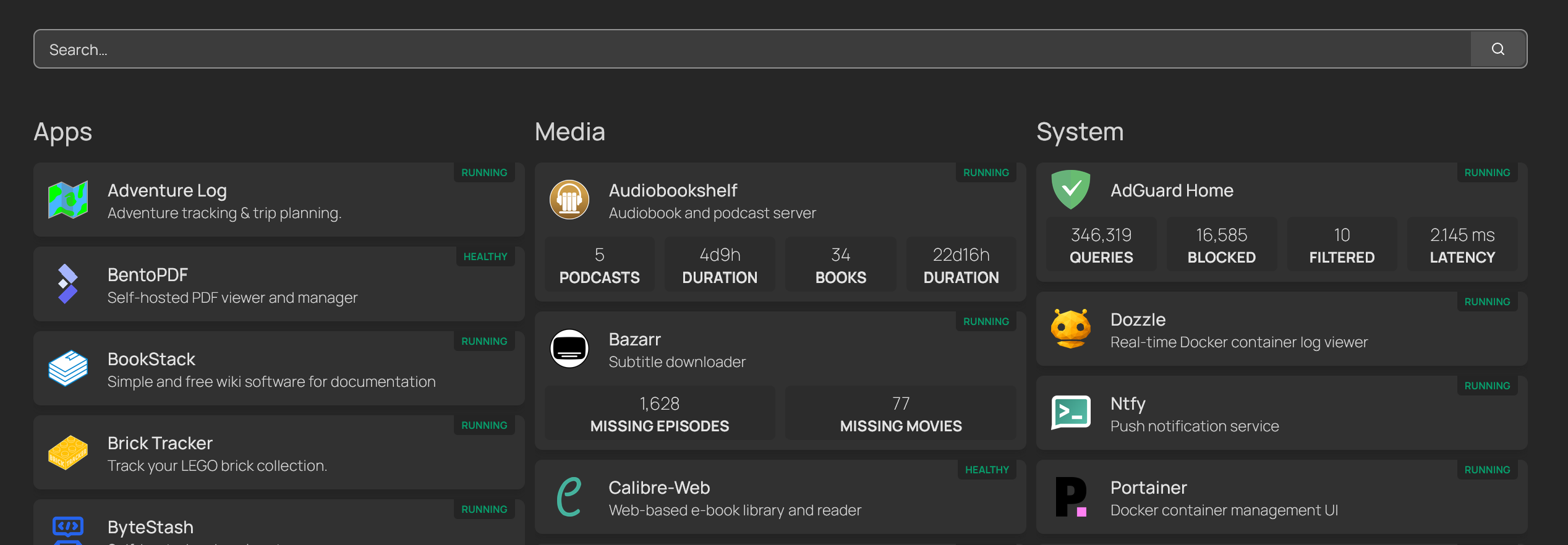
After adding labels to a handful of containers across both LXCs, the dashboard populated on its own. Groups appear automatically, icons are resolved from the label values, and descriptions come straight from the container metadata. The screenshot above shows the end state: services grouped by category, with status badges showing which containers are running.
Adding a new service now means one extra block of labels in the compose file. The dashboard takes care of the rest.