Plex remote access works fine until you move to a properly segmented network. On a flat home network, Plex can negotiate port forwarding automatically. Add VLANs and a zone-based firewall, and that negotiation silently fails. The fix is UPnP, but enabling it the wrong way creates a bigger problem than the one you’re solving.
The Problem
Plex uses UPnP (Universal Plug and Play) to ask your router to open and forward an external port back to the Plex server. On a UniFi setup with multiple VLANs, UPnP is disabled by default. Without it, Plex can’t register a port mapping and falls back to relaying traffic through Plex’s own servers, which is slower and not always reliable.
Enabling UPnP the Right Way
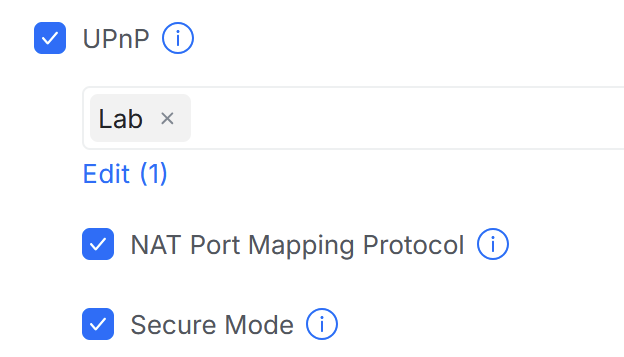
In the UniFi console, go to Settings → Internet → WAN and enable UPnP. The scope setting matters here. Do not enable it for every VLAN. Restrict it to the network Plex actually runs on, in this case the homelab VLAN.
Enabling UPnP broadly across IoT, Kids, or guest networks is a real security risk. Any device on those networks can then use UPnP to punch arbitrary holes in your firewall without you knowing. IoT devices in particular have a history of abusing this.
Additional Settings
- Secure Mode: Enable Secure Mode alongside UPnP. This restricts what a device can do with UPnP: it can only open ports that redirect traffic back to itself. Without secure mode, a device could theoretically forward incoming traffic to a different host on your network. With it on, the scope of what UPnP can do is much narrower.
- NAT-PMP: NAT-PMP (NAT Port Mapping Protocol) is Apple’s alternative to UPnP. Plex supports both. It’s a simpler protocol with slightly more predictable behaviour. Enable it alongside UPnP. There’s no meaningful downside to having both active.
Applying the Change
After saving the settings, either restart the Plex Media Server process or toggle remote access off and back on in Settings → Remote Access. Plex will re-negotiate the port mapping and remote access should show as active within a minute or two.
The full configuration: UPnP scoped to homelab only, Secure Mode on, NAT-PMP on.